
Digital signature validator: the ten-second test
To validate a digital signature on a PDF, open the file in Adobe Acrobat Reader and read the bar at the top. A blue bar saying "Signed and all signatures are valid" means the signatures check out and nothing changed after signing. Here is how to verify a signed PDF properly, and what every result means.
Nothing is uploaded: the test runs in Acrobat on your own computer.
How to verify a signed PDF
Three steps in free Adobe Acrobat Reader on a computer. The first one alone answers most questions.
Open the signed PDF in Adobe Acrobat Reader
Download the document and open it in Adobe Acrobat Reader on a computer. Reader is free. A browser tab won't do: Chrome's built-in viewer and most online viewers don't check signatures.
Read the bar at the top
A properly signed PDF shows a blue bar saying "Signed and all signatures are valid", or "Certified by" followed by the certifier's name. A red cross means a signature is invalid. No bar at all means there is no digital signature to check.
Open the Signature Panel and check every revision
Click Signature Panel and expand each entry. Every revision should be green: the certification, each signer, and the final document timestamp. Each should say the signature is valid, the document has not been modified since, the certificate is trusted, and the signature is LTV enabled.
What the result means
Acrobat gives one of four answers. Only the first one is proof.
Blue bar
"Signed and all signatures are valid"
Or "Certified by" with the certifier's name. Every signature checks out against a trusted certificate, and the document hasn't changed since it was signed.
Red cross
"At least one signature is invalid"
On a certified document it reads "Certification ... is invalid". The file was changed after signing. The Signature Panel can show what, for example "1 Page(s) Modified".
Warning triangle
"At least one signature has problems"
Acrobat can't confirm a signature. Usually the certificate isn't trusted, for example because it isn't on the Adobe Approved Trust List. Click the signature in the panel to see the reason.
No bar at all
Nothing to check
There is no digital signature in the file. A picture of a handwritten signature stamped on a page looks signed, but proves neither who signed nor whether the text changed.
Check every revision in the Signature Panel
A well-signed document tells its own story, one green revision per step.
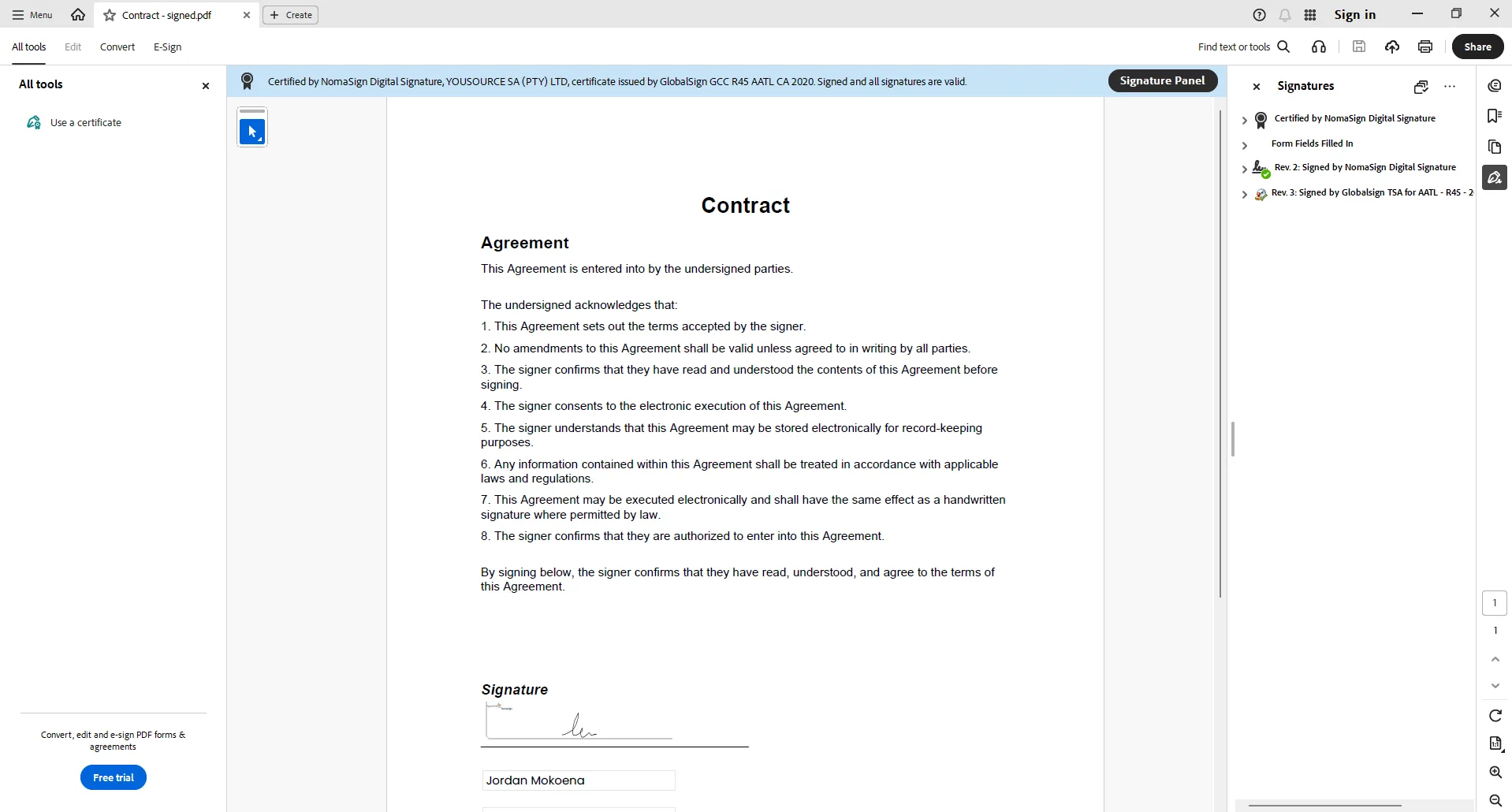
The revisions you want to see
- The certified revision. Sealed when the document was sent. It sets the rules for what later revisions may change.
- One revision per signer. Each signature locks the document as it stood at that moment, so you can see who signed what, and when.
- A final document timestamp. Independent proof of when the document was completed.
Expand each one and look for
- Signature is valid.
- The document has not been modified since this signature was applied.
- The signer's identity is valid: the certificate is trusted, for example through the Adobe Approved Trust List (AATL).
- Signature is LTV enabled, so it can still be checked after the certificates expire.
Three ways a document can fool you
Each of these looks fine at a glance.
It looked fine in my browser
Chrome's PDF viewer, and most online and in-app viewers, don't show whether a signature is valid. A changed document looks exactly like the original there.
A picture of a signature
A scanned or drawn signature pasted onto the page carries no proof. Acrobat shows no bar, and anyone with a PDF editor can move it to a different document.
One signature at the very end
Some providers add a single signature once everyone has signed, plus an audit page. You can't see who changed what at which stage, and the audit page itself is a change made after the parties signed.
Don't take our word for it
Acrobat checks signatures on your own computer, against Adobe's trust list, not ours. Download a real NomaSign-signed document from The Proof File and run the ten-second test on it. Then run it on a document from your current provider and compare the Signature Panels.
Using Foxit? Foxit PDF Reader on a computer checks signatures too, with its own wording. We use desktop Acrobat Reader as the reference, so the messages on this page are Acrobat's.
What a NomaSign document shows
Every NomaSign document is certified the moment you send it. Each signer's signature is added as its own sealed revision with its own RFC 3161 timestamp, and a final document timestamp closes the file (PAdES B-LTA). Every revision is LTV enabled, so the document still validates years from now.
Unlimited documents and signers from R99 a month, with a 14-day free trial. Read more about digital signing with NomaSign, the difference between digital signing and e-signatures, or the ECT Act.
Digital signature validation FAQ
Is a drawn signature a digital signature?
Why does Adobe say "at least one signature has problems"?
What does LTV mean?
Is a digitally signed PDF legally valid in South Africa?
Sources: ECT Act 25 of 2002 (gov.za)
Can I check a signature in Chrome or on my phone?
Do I have to upload my document to NomaSign?
Send documents that pass the test
Unlimited documents from R99 a month. Your clients sign without creating an account.